

Running a care agency means keeping on top of training, compliance, and regulations. One requirement you might have come across is ASC-WDS.
If you’re wondering what it is, why it matters, and how to register, this guide will walk you through everything step by step.
ASC-WDS stands for Adult Social Care Workforce Data Set.
It’s a national database, managed by Skills for Care, that collects information about the adult social care workforce in England.
Previously known as NMDS-SC (National Minimum Data Set for Social Care), ASC-WDS is now the central system that records:
Details about your workplace
Information about your staff
Training and qualifications
The purpose is to build a clear picture of the sector, while giving care providers access to funding, insights, and support.
Registering with ASC-WDS is not legally mandatory, but it brings several important benefits:
Access Workforce Development Funding (WDF) – helps cover staff training costs.
Support CQC inspections – CQC recognises ASC-WDS as evidence of workforce planning and staff development.
Gain insights – compare pay, qualifications, and turnover rates with other providers.
Enhance credibility – registration shows your agency values quality care and staff investment.
In short: if you want to grow your agency, attract staff, and stay competitive, ASC-WDS is worth it.
Joining ASC-WDS opens doors to funding, training, and powerful workforce insights. If staff development is on your mind, take a look at our blog on Advance Learner Loan 2025: step-by-step guide for adult learners to see how your team can upskill with no upfront cost.
ASC-WDS applies to any organisation delivering adult social care services in England, including:
Care homes (residential and nursing)
Domiciliary care agencies
Supported living providers
Community-based services
If your staff provide regulated care, registering is strongly recommended.
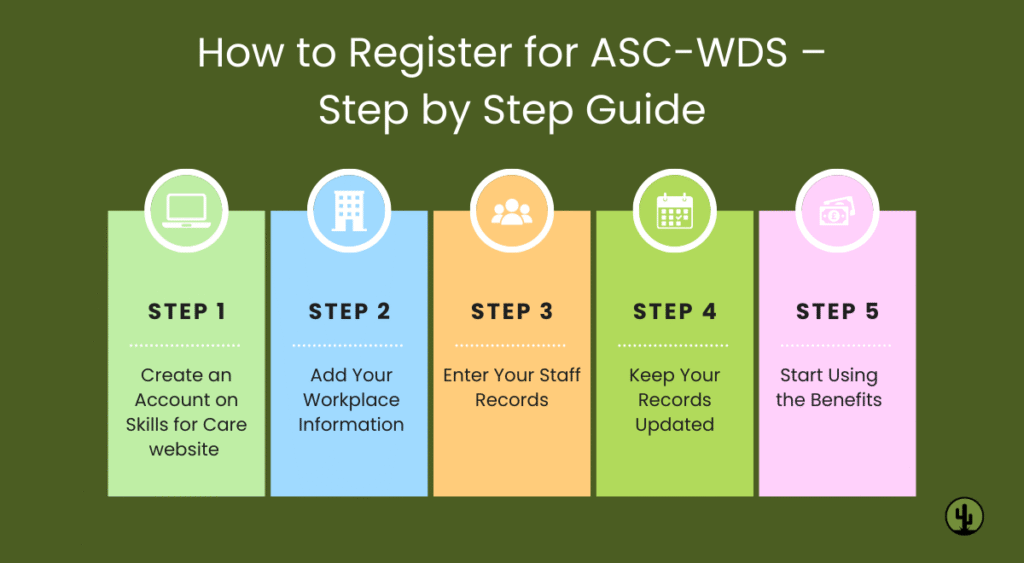
Here’s a simple breakdown of the process:
Step 1: Create an Account
Go to the Skills for Care website and register your workplace.
Step 2: Add Workplace Information
Provide your service type, CQC registration number (if applicable), and contact details.
Step 3: Enter Staff Records
Add details about each employee, including job roles, qualifications, and training.
Step 4: Keep Records Updated
Update your account at least once a year to keep eligibility for WDF and maintain accurate records.
Step 5: Start Using the Benefits
Once registered, you can apply for funding, access data reports, and demonstrate compliance to regulators.
At London Cactus College, we know that ASC-WDS registration can feel overwhelming. That’s why we offer support at every stage:
Step-by-step guidance on how to register
Help with setting up your account and adding staff records correctly
Advice on claiming Workforce Development Funding
Ongoing support to keep your data updated
We make the process simple, so you can focus on providing care while we handle the admin.
Is ASC-WDS mandatory?
No, but it’s highly recommended if you want funding and to meet CQC expectations.
Does it cost anything?
No. Registering and using ASC-WDS is completely free.
How often should I update my data?
At least once a year, but ideally whenever staff or training changes occur.
Can I register multiple branches?
Yes, you can manage several workplaces under one account.
ASC-WDS might sound like just another system to learn, but it’s actually a tool that helps care agencies grow, save money, and stay compliant.
Whether you’re a new agency or expanding your team, ASC-WDS registration sets you on the right path. And if you’re also exploring careers in care, don’t miss our article on How to start a career in health and social care.
At London Cactus College, we’re here to make the whole process simple, so you can focus on what really matters: delivering quality care.